
AI Search pulls content from owned pages through crawlers run by each major AI vendor. The crawlers respect robots.txt rules you publish. Bad rules cause self-inflicted citation outages. Major AI systems then cannot reach your content at all. The split between training data and real-time retrieval matters because most brands want to allow retrieval bots, the real-time citation surface, while deciding on training bots separately. This chapter covers the user agents that matter most. The training-vs-retrieval split comes next, followed by the wholesale-block trap that catches many brands and the verification workflow operators actually run. Two sections then cover the CDN edge issues that override robots.txt and the worked configurations for permissive, balanced, and restrictive postures. The fix is fast.
Why This Technique Matters
The simplest failure in AI Search is the easiest to fix. robots.txt matters. A bad rule blocks AI crawlers from your pages, no content reaches the retrieval index, and no citations occur, no matter how strong your Mentions, Evidence, Relevance, or Entity work is. You earn zero AI Search citations.
Most brands that audit their robots.txt find blocking rules they did not expect. Old CMS defaults blocked broad classes of bots without splitting AI crawlers from scrapers, staging rules sometimes leak to production, legacy security policies block bots without thought, and WordPress plugins write robots.txt rules without operator input. A crawler-access audit is a routine part of any technical SEO engagement, and it is the first place to look when citations stall for no obvious content reason. Fix this and the bots regain access, which lifts the ceiling the block was imposing on citation share.
The decision is hard because of the training-vs-retrieval split. AI vendors run different crawlers for different jobs. Retrieval bots feed the real-time citation surface. Training bots collect content for future models. That compounds long-term entity recognition. It does not produce current citations. Both decisions are valid. What is not valid is blocking everything by default. Allowing everything without thought is also a mistake.
What is not valid is blocking everything by default.
The technical layer goes deeper than it looks, because Cloudflare and other CDN providers added bot management in 2024 and 2025. These can block AI crawlers at the edge, before a request ever reaches your origin, and at that point the robots.txt sitting on the origin doesn't matter. CMS hosts also handle robots.txt in their own ways (WordPress, Squarespace, Wix, and Shopify each have platform-specific overrides), so a config that works on a static site may not work on a CDN-fronted dynamic platform, and I'd verify at the real production edge since origin checks alone aren't enough.
The Training-Versus-Retrieval Bifurcation
AI vendors split their crawlers into 2 groups, each with its own user-agent strings, and I'd get clear on that split before making any access decisions.

Training Bots
Training bots collect content to train future versions of a model; that content goes into training datasets, and those datasets shape what the model knows about brands, topics, and operators. The benefit of letting them in is that future models know more about your brand, which compounds long-term entity recognition and lowers your reliance on real-time retrieval. The cost is just as plain (your content feeds a vendor's commercial training data), and some brands see that as a competitive concession.
Major training bots in 2026.
- GPTBot. OpenAI's training-data bot, documented at openai.com/gptbot, which collects content for future GPT versions.
- ClaudeBot. Anthropic's model-development crawler, which collects public web content that may be used to train and improve Anthropic's models. The name reads like a retrieval agent, but it isn't one.
- anthropic-ai. Anthropic's legacy training-data crawler (the user agent string is lowercase with a hyphen), since superseded by ClaudeBot.
- Google-Extended. Governs whether your content trains Gemini models and grounds answers in Gemini Apps and Vertex AI. It's a different thing from Googlebot and doesn't decide whether you appear in Google Search or AI Overviews; Google states plainly that Google-Extended doesn't affect a site's inclusion in Search and isn't a ranking signal. I'd allow it if you want to stay available to Gemini Apps grounding and block it if you'd rather sit out Gemini training, and either way your AI Overviews eligibility depends on Googlebot.
- CCBot. The Common Crawl bot. Common Crawl gives many AI vendors their core web corpus, so blocking CCBot cuts your training inclusion across multiple vendors at once.
- Bytespider. ByteDance's training bot, which affects TikTok and ByteDance AI products.
- Applebot-Extended. Apple's training-data crawler, separate from the standard Applebot search crawler, and the one that affects future Apple Intelligence training.
Retrieval Bots
Retrieval bots fetch content in real time, when users send queries to the AI system, and that content goes into the immediate response (it isn't always kept for training). Letting them in earns you direct citation share on current queries; blocking them means the AI system can't cite you in real-time responses, and real-time citation is the outcome most brands are after.
Major retrieval bots in 2026.
- OAI-SearchBot. OpenAI's retrieval bot for ChatGPT search, which pulls content for ChatGPT's web-aware responses; for ChatGPT citations it's the single most important bot to allow.
- ChatGPT-User. A separate OpenAI bot for ChatGPT browsing that runs when users trigger browsing in real time. Its traffic pattern differs from OAI-SearchBot, but the citation function is the same.
- Claude-SearchBot. Anthropic's search-discovery crawler, which indexes content for Claude's search results, so it's the bot to allow for Claude search visibility.
- Claude-User. Anthropic's user-directed fetcher, which retrieves a page when a Claude user's question requires it (the same function as ChatGPT-User).
- PerplexityBot. Perplexity's retrieval crawler and the single most important bot to allow for Perplexity citations.
- Perplexity-User. A separate agent Perplexity uses for user-triggered fetches, similar in function to ChatGPT-User.
- Applebot. Apple's search index crawler (a different bot from Applebot-Extended), which affects Spotlight and Siri results.
- Googlebot. The standard Google search index crawler, core for organic ranking, and the crawler AI Overviews inherits from.
- Bingbot. The standard Bing crawler, which handles regular Bing indexing and feeds Microsoft Copilot; Bing hasn't split into training-vs-retrieval bots.
These bots feed the real-time citation surface, so blocking any one of them caps your citation share on that platform. If you want AI Search citations the strategy itself is simple (allow the retrieval bots), and the hard part is making sure they're actually allowed at the technical level.
What an Allowed Crawler Can Actually Read
Allowing a bot gets it to your page, but that doesn't guarantee it can read what's there. Whether your content survives the trip from fetch to model comes down to 3 blind spots: JavaScript that never runs, JSON-LD that never gets parsed, and page-level directives that forbid the excerpt even when the fetch succeeds. All 3 are easy to miss, because in your own browser, with everything rendered, the page looks complete.
JavaScript. Rendering content in the browser is not a liability, it is a block. For the AI answer engines it is a straight-up block, and for Google and the other traditional engines it is close to one. Google will tell you Googlebot renders JavaScript, and it does, alongside Applebot, with Gemini rendering through Googlebot. In practice it renders poorly. Rendering is a separate, queued phase that runs only once Google's resources allow, behind the first crawl and subject to timeouts, blocked resources, and script errors, and a JavaScript page costs Google roughly nine times the crawl time of plain HTML. It fails often enough that a JavaScript-dependent site is barely indexed in Google, late, partially, or not at all. The AI crawlers do not even try. A joint Vercel and MERJ analysis tracked more than 500 million GPTBot fetches and found zero evidence of JavaScript execution; even the roughly 11.5% of the time GPTBot downloaded a script file, it never ran it (Vercel, The rise of the AI crawler). ClaudeBot, OAI-SearchBot, and Perplexity behave the same way, and Anthropic's own documentation states its fetch tool does not support pages rendered via JavaScript. They read the raw HTML and move on.
The consequence does not stop at a missed crawl. AI answers are built by retrieval-augmented generation: the system retrieves passages from what it has indexed or fetched, then grounds its answer on that retrieved text. Content that only exists after the browser runs a script is never in the raw HTML, so it never enters the retrieval corpus, and there is nothing of yours for RAG to pull. The model is not deciding against citing you; it has no passage from you to ground on in the first place. Move priority content into server-rendered HTML so it is present in the raw response, and test it by loading the page with JavaScript disabled: if the content disappears, the crawlers and the retriever see nothing.
JSON-LD. This one is the mirror image: search engines read your JSON-LD, but the language model doesn't parse it when it generates an answer (Chapter 9). Schema is a discovery-layer signal that helps engines disambiguate your entity, and it isn't a channel for feeding facts to the model, so a fact that has to reach the AI can't live only in structured data. If it matters, I'd put it in the visible, server-rendered text of the page, where a crawler that neither runs scripts nor parses schema can still read it.
The crawler reads your server-rendered text, so anything that needs JavaScript to appear (or lives only in JSON-LD) is invisible to the models that matter most.
The rule I take from both is to render your critical facts as plain, server-side text and treat JavaScript and schema as enhancements layered on top, never as the way the facts themselves get delivered. You can do everything else in this chapter correctly (allow every retrieval bot, pass every robots.txt check) and still be invisible, because the content only exists after a script runs or only inside a block the model never reads.
Page-level snippet directives. robots.txt decides whether a crawler may fetch the page, and a separate layer decides whether what it fetched may be quoted in an answer; that layer is invisible to every check in this chapter, since the fetch succeeds, the log shows a 200, and the page still can't appear. These directives live in a meta robots tag or an X-Robots-Tag response header. nosnippet forbids any text excerpt, which removes the passage a generative answer would have quoted, and max-snippet caps excerpt length, so a low cap leaves the answer with too little to quote. data-nosnippet does the same for a single element (a stray attribute on a wrapper can suppress the exact paragraph you wrote to be cited), and noarchive and noindex pull the page out of the index the retrieval layer draws from. I'd audit these alongside robots.txt instead of after it. Counter-test: fetch your top 10 pages and search the response headers and the head for nosnippet, max-snippet, data-nosnippet, noarchive and noindex.
The Wholesale-Block Trap
The most common failure is a robots.txt that blocks everything by default, and it gets there through one of 3 patterns.
Legacy CMS Defaults
Some CMS platforms published default robots.txt rules with broad blocking patterns, though the defaults vary by platform (WordPress, Drupal, and older platforms each behave differently, with some blocking specific directories and others having no rules at all), and the "User-agent: * Disallow: /" pattern shows up by default in some hosting setups, where it can leak into production if nobody catches it.
The audit is quick: I'd fetch robots.txt from your production domain (https://yourdomain.com/robots.txt) and look for any Disallow: / rule under a generic User-agent: * block, since that one rule blocks every bot (AI crawlers included), and if it's there I'd remove the wholesale block and replace it with selective rules that allow the bots you want and block only the ones you have a reason to exclude.
Staging-to-Production Misconfiguration
Staging environments often carry blanket-block robots.txt rules so search engines don't index pre-production content, and when a deploy doesn't keep the environments separate, those rules sometimes reach production by mistake, which leaves the live site with a staging-style robots.txt that blocks every crawler.
You'll usually spot it as organic search traffic and AI citations dropping together with no content change the team can point to, and the cause is usually a robots.txt mistake from a recent deploy. To confirm it I'd pull the robots.txt history from your deploy logs and compare it against the expected production state; the fix is to redeploy the correct robots.txt and then watch Google Search Console and the AI bot logs until the bots show up again.
WordPress Plugin Overrides
SEO plugins on WordPress rewrite robots.txt from their own settings (Yoast, Rank Math, and All in One SEO all have features that change it), and since operators can set those wrong, toggling one without knowing what it does can switch on broad blocking.
The tell is a robots.txt file on disk that doesn't match what production returns, because the plugin generates that response on the fly; the fix is to go through the plugin settings and turn off whatever feature is blocking bots you want to allow.
Verification Workflows
Checking crawler access in practice comes down to 3 verification methods.
Direct robots.txt Inspection
I'd fetch the robots.txt directly, with curl or your browser at https://yourdomain.com/robots.txt, and read it line by line: every User-agent block and its Allow and Disallow rules. Then I'd map each bot you care about (the retrieval bots above plus any training bots that matter to you) against those rules and confirm each one has the access you want.
Direct inspection covers the simple cases, and it misses several things: CDN-layer overrides, a dynamic robots.txt that returns different content to different user agents, and Cloudflare-style bot management, which returns 403 responses no matter what robots.txt says.
User-Agent Simulation
To simulate a bot fetch, I'd send an explicit user-agent: curl -A "GPTBot/1.0" https://yourdomain.com/somepath. The response status, headers, and body show how the server treats that bot. A 200 response with content is a success, a 403 or 429 means blocking (often at the CDN layer instead of in robots.txt), and a 200 with an empty body or a redirect means the server treats the bot differently from a browser.
User-agent simulation is the strongest of the 3 tests because it hits the same production behavior the bot would, so I'd run it for every major bot you care about (OAI-SearchBot, ChatGPT-User, Claude-SearchBot, Claude-User, PerplexityBot, Googlebot, Google-Extended, and GPTBot) across at least 3 URLs (a homepage, a content page, and a product page), since the variation across bots and URLs turns up problems that direct inspection misses.
Server Log Analysis
Server access logs tell you which bots are crawling the site, how often, and which URLs each one pulls, so filtering them by user-agent gives you each bot's activity; if you're on Cloudflare or another CDN, though, I'd pull the logs from the CDN edge (Cloudflare Logs, Fastly logs, or AWS CloudFront logs all work), because the CDN handles many bot requests without ever forwarding them and origin server logs on their own aren't enough.
What I'd expect to see is each major bot you care about showing up at a non-zero rate that matches its published crawling behavior. A bot that should be active but has no entries has an access problem at some layer, and one with high error rates (403, 429, 503) is blocked somewhere, often at the CDN layer.
Worked robots.txt Configurations
The common postures come down to 3 configurations, each written as a full robots.txt block, and I'd adapt the user-agent list in whichever one you pick to your own decisions.

This one lets every major AI bot in (retrieval and training both) and blocks only the paths that should never be indexed, like admin, internal APIs, and staging URLs, which gets you the widest citation surface and the most long-term entity recognition.
User-agent: *
Allow: /
Disallow: /wp-admin/
Disallow: /admin/
Disallow: /api/internal/
Disallow: /staging/

Sitemap: https://yourdomain.com/sitemap.xml
Since the posture allows every bot by default and only blocks paths that shouldn't show up in AI Search or organic search results, it's where most mid-market brands operate; my read is that the cost of contributing to training is low for them and the citation benefit compounds.
Retrieval bots are allowed, which covers the current citation surface, and training bots are blocked, which cuts your contribution to future model training; the posture keeps your content out of training while holding your citation share on current AI Search responses.
User-agent: GPTBot
Disallow: /

User-agent: ClaudeBot
Disallow: /

User-agent: anthropic-ai
Disallow: /

User-agent: Google-Extended
Disallow: /

User-agent: CCBot
Disallow: /

User-agent: Applebot-Extended
Disallow: /

User-agent: Bytespider
Disallow: /

User-agent: OAI-SearchBot
Allow: /

User-agent: ChatGPT-User
Allow: /

User-agent: Claude-SearchBot
Allow: /

User-agent: Claude-User
Allow: /

User-agent: PerplexityBot
Allow: /

User-agent: *
Allow: /
Disallow: /wp-admin/
Disallow: /admin/

Sitemap: https://yourdomain.com/sitemap.xml
Training bots are blocked by name (ClaudeBot among them, since ClaudeBot is Anthropic's model-development crawler and isn't a retrieval agent), and the retrieval agents are allowed by name so the intent survives a later change to the wildcard: OAI-SearchBot, ChatGPT-User, Claude-SearchBot, Claude-User, PerplexityBot, and Googlebot.
Everything is blocked by default, and only the major retrieval bots and Googlebot are allowed. This posture suits premium-content brands (research firms, news publishers, and other premium-content businesses) that want full control over which bots can reach their content.
User-agent: Googlebot
Allow: /

User-agent: Bingbot
Allow: /

User-agent: OAI-SearchBot
Allow: /

User-agent: ChatGPT-User
Allow: /

User-agent: Claude-SearchBot
Allow: /

User-agent: Claude-User
Allow: /

User-agent: PerplexityBot
Allow: /

User-agent: Perplexity-User
Allow: /

User-agent: Applebot
Allow: /

User-agent: *
Disallow: /

Sitemap: https://yourdomain.com/sitemap.xml
Default-deny with an explicit allow for the major retrieval bots means you still earn AI Search citations from the allowed platforms while contributing nothing to training, Common Crawl, or other data collection. The trade-off is real, though, because long-term entity recognition depends on the major training bots, and this posture caps the long-term compounding that training inclusion would have added.
CDN-Layer Overrides
Modern web infrastructure routes traffic through a CDN edge before it reaches the origin server, and the CDN can enforce bot management rules on its own, at a layer where the origin robots.txt doesn't matter. Cloudflare, Fastly, Akamai, AWS CloudFront, and others all support some form of bot management.
Cloudflare is the most common case in 2026. It added AI bot blocking features in 2024 and turned them on by default for some plan tiers in 2025, and since that blocking happens at the CDN edge before requests reach the origin, the bot gets a 403 or 429 response no matter what the robots.txt at origin says.
On a Cloudflare-protected site I'd go into the dashboard (Security, then Bots) and inspect the bot management rules, because the default may block AI bots and you may need to allow-list specific user agents to let them through; that change at Cloudflare is separate from the robots.txt edit, and access only works end-to-end once both are done.
Other CDNs need a similar check, since a brand on a non-Cloudflare CDN still has to confirm that its bot management isn't overriding what robots.txt intends, and the test is the same user-agent simulation as above (curl with explicit bot user agents, which shows the real edge behavior). On sites where the CDN, hosting, and platform configuration are tangled enough that crawler access can't be fixed cleanly, my read is that the access problem is often a symptom of deeper infrastructure debt, the kind a website rebuild or platform migration resolves at its source.
Serving Clean Content to AI Crawlers: Cloudflare Markdown for Agents
The CDN layer can also do the opposite of blocking and hand AI crawlers a cleaner version of the page: Cloudflare launched Markdown for Agents in February 2026, a content-negotiation feature that converts a page to markdown at the edge when an AI crawler asks for it (the crawler sends an Accept: text/markdown header, Cloudflare fetches the HTML from your origin, reduces it to markdown, and returns that instead), and it's in Beta at no cost on Cloudflare's Pro, Business, and Enterprise plans.
The reason I care about it is token economy. Cloudflare measured roughly an 80% reduction in tokens between a page's HTML and its markdown equivalent, since the markup that means nothing to a model (divs, classes, inline styles) gets stripped out and a heading that costs 12 to 15 tokens in HTML costs about 3 in markdown, so when an agent retrieves your page, more of its limited context window goes to your actual content and less to markup it would discard anyway (and cleaner input is easier for the model to parse and cheaper for it to hold).
I want to be precise about what this buys, though. Cloudflare makes no citation claim and markets the feature on efficiency alone, but in our own testing at Searchbloom, turning Markdown for Agents on measurably raised how often AI crawlers pulled our pages; that's a retrieval signal, one step upstream of citation and short of a proven citation lift, so we treat it as an experimental, low-cost bet with a measured retrieval upside and I wouldn't count on it as a guaranteed path to more citations.
It's also the credible successor to llms.txt. Where llms.txt asked you to hand-maintain a separate markdown file that AI providers never committed to reading, Markdown for Agents runs at the edge on the crawler's own request, so it gets used when the crawler wants it and costs nothing to maintain. I'd enable it in the Cloudflare dashboard alongside the bot-management rules above, then confirm crawlers are getting the markdown variant by requesting your page with an Accept: text/markdown header and checking for the x-markdown-tokens response header. I'd also measure AI-crawler retrieval in your logs before and after, so the call rests on your own data and not on the vendor's framing (or ours).
Sitemap.xml Integration
The Sitemap directive in robots.txt points crawlers at your sitemap.xml, which lists all the URLs you want indexed, and AI crawlers respect sitemap discovery and use it to prioritize indexing of your important pages. For teams setting this up the first time, the mechanics of sitemaps and the structured-data signals that travel with them are worth a separate read.
The sitemap.xml should include every public page on your domain, each with an updated timestamp (lastmod). For brands that update content often I'd run automated sitemap generation, so the sitemap stays in sync with what's actually on the site; a stale sitemap with old lastmod timestamps slows crawlers down, and it slows the citation lift on refreshed content too.
Sitemap index files support multiple sitemaps, which is what I'd use for sites with thousands of URLs: the index references many individual sitemap files, and the typical practice is one sitemap per content type (separate ones for blog posts, product pages, video URLs, and so on). Each sitemap has a maximum of 50,000 URLs or 50 MB uncompressed.
The Quarterly robots.txt Audit Workflow
Quarterly is the right cadence for robots.txt audits, because the failures that affect AI crawler access compound when nobody checks. New AI bots keep arriving (platforms launch new ones, and existing vendors split their crawlers into more granular user agents: training vs retrieval, content vs index, primary vs user-triggered), CDN bot management updates from Cloudflare, Fastly, AWS CloudFront, and Akamai can silently change access through taxonomy migrations or default-policy changes, and WordPress SEO plugin updates rewrite robots.txt based on plugin defaults the operator may never have opted into. A quarterly audit catches that drift before it spreads; brands on slower cadences (semi-annual or annual) often find out much later that they missed a major new bot, or that a vendor update has been suppressing access for an extended stretch.
Step 1: Bot list refresh. I'd start by updating your canonical list of user agents from current vendor docs: OpenAI publishes its bot inventory at openai.com/gptbot (current user-agent strings for GPTBot, OAI-SearchBot, and ChatGPT-User), Anthropic publishes its inventory in its crawler documentation (ClaudeBot, Claude-SearchBot, Claude-User, and the legacy anthropic-ai agent), Google publishes its full crawler list at developers.google.com/search/docs/crawling-indexing/google-common-crawlers (Googlebot, Google-Extended, and any newer agents from AI Overviews and Gemini surfaces), and Microsoft, Apple, ByteDance, and Perplexity publish similar inventories on their developer pages. Since the list usually grows by only a few entries each quarter, the refresh is a quick sweep across the major vendor docs, and I'd save what you find as a versioned bot-inventory document in your technical SEO docs.
Step 2: robots.txt verification. Next I'd fetch the current production robots.txt from your primary domain and any public subdomains and compare it against your intended posture document, which should be a versioned reference for the permissive, balanced, or restrictive posture you've chosen. Anything added, removed, or changed since the last audit gets flagged (especially a change with no explicit decision behind it in the change log), because the common failure is rules added by automated systems like SEO plugins, CMS upgrades, and hosting-provider defaults, and checking every quarter catches those silent additions before they pile up, along with outright corruption of the file itself (encoding issues, file truncation, or a deploy that pushes staging-style blanket-block rules to production).
Step 3: User-agent simulation. Then I'd run curl with explicit user-agent strings against 5 to 10 URLs for each major AI bot, using a set that covers the homepage, 2 to 3 primary content pages, a product or service page, a blog post, and whatever else you want to verify (recently launched landing pages, refreshed content, and pages with high citation share all qualify).
For each bot the pattern is curl -A "BotUserAgent" https://yourdomain.com/path, and I'd document the response code, the headers, and a sample of the body, flagging any 403 (forbidden), 429 (rate limited), or timeout as an access issue somewhere in the stack. Comparing those codes against the prior quarter's results is where drift shows up (any change on a bot that used to work needs investigating), and it's why I'd call simulation the strongest test in the audit, since it checks the real production behavior an AI bot hits when it crawls your content.
Step 4: CDN edge verification. If your site is fronted by Cloudflare, Fastly, AWS CloudFront, Akamai, or any other CDN with bot management, I'd verify the bot management rules at the edge on top of the robots.txt check; on Cloudflare that means the dashboard again (Security, then Bots), looking for changes to the rules since the last audit and making sure the allowlist rules still match the current bot category classifications.
That last part matters because if Cloudflare has updated its taxonomy since your last audit, the allowlist rules may have been silently orphaned (a taxonomy migration that orphans them is a common failure mode), so I'd check the recent challenge-passed rate for each major bot user agent, where a rate near 100 percent means the bot is reaching origin and anything below 90 percent means partial blocking worth investigating. Fastly, AWS CloudFront, and Akamai get the equivalent check against their own bot management surfaces.
Step 5: Server log analysis. In the access logs I'd filter by user-agent string for each major AI bot and confirm each one is making requests at a non-zero rate (on a typical mid-market site, every retrieval bot you allow should show up at least daily, and if one doesn't, it isn't reaching the site). I'd also flag any sustained drop in request volume for an active bot, because a bot that made 200 requests per day and now makes 5 has suppressed access even when the individual requests still return 200 responses, and comparing access patterns against the prior quarter is how those trends surface.
If you're on Cloudflare or another CDN, the logs have to come from the CDN edge (Cloudflare Logs, Fastly logs, or AWS CloudFront access logs), since the CDN may handle many bot requests without forwarding them and origin server logs alone won't show it; it's a contained task, and the effort depends on your log volume and analytics tooling.
Step 6: Plugin and CMS check. On WordPress I'd check whether Yoast, Rank Math, or All in One SEO has silently modified your robots.txt rules, because each has its own robots.txt management surface and a version update can change default behavior without the operator noticing; plugin developers document those changes in the changelog and rarely send proactive notifications, so I'd read each plugin's version changelog for robots.txt-related changes since the last audit. Shopify, Squarespace, Wix, Webflow, Sitecore, and Drupal need the same check, since each has its own surface for managing robots.txt and its own update cadence that can change default behavior, and this is often the step where a quarterly audit turns up the most surprising drift (plugin updates rarely flag robots.txt changes in their release notes).
Step 7: Documentation and remediation. I'd document every finding in a versioned audit log (date, who ran the audit, findings by step, and remediation status for each finding), since that log drives the remediation work and gives future audits context on prior issues. Each flagged issue gets a remediation work item with an explicit owner and a target completion date, and I'd track time-to-fix with the goal of a fast turnaround from detection to deployed fix. Critical issues (full bot blocking and configs that hit citation share) get fixed first and with urgency; brands that remediate promptly lose less citation share to technical issues, and brands that let remediation drift into the next quarter's audit cycle lose more.
The team and tooling for the quarterly audit scale with site complexity. Most mid-market brands run it through a single engineer or technical SEO specialist, and for sites under 50,000 URLs it's a contained engagement, with most of the effort in steps 3 and 5 (user-agent simulation and server log analysis are the heavy ones). Larger sites benefit from automation: shell scripts or Python notebooks can run the user-agent simulation across a representative URL sample and pipe the output into a spreadsheet or database for comparison against prior quarters, and some brands run the simulation in their CI/CD pipelines to get automated bot-access checks on a daily cadence that alert when response codes change. That automation pays back quickly for brands with 100,000-plus URLs and for brands with high sensitivity to citation share, since a sustained blocking incident can have real revenue impact.
Once a year I'd run a deep audit that expands the quarterly scope. It covers a full sitemap audit (verifying lastmod accuracy across the entire sitemap, finding broken URLs, and finding coverage gaps where new content hasn't been added) and a cross-subdomain robots.txt consistency check, so the apex domain, the www subdomain, and any other public subdomains return the same rules where you intend them to. It also compares crawl-rate trends across the full year to find bots that have been steadily losing access (quarterly snapshots may have missed those) and reviews any bot categories the brand has blocked, to confirm the original decision still matches the strategy. Last, it revisits your intended posture document to reconfirm that the permissive, balanced, or restrictive choice still fits the brand's positioning; a brand that has changed positioning over the year may need to update its posture.
The quarterly audit is point-in-time verification inside your broader technical-health monitoring, which means it catches drift that has piled up since the prior audit and misses drift that happens and recovers in between. Brands with high sensitivity to citation share add continuous monitoring on top (automated daily curl checks against a representative URL set, alerting when response codes change for any major bot user agent), which catches incidents almost as they happen and cuts the permanent citation-share loss when a CDN taxonomy migration silently orphans bot allowlist rules between audits. Without the engineering capacity for continuous monitoring, I'd move the audit to monthly during active vendor change (major CDN platform updates, AI vendor bot reorganizations, and large CMS upgrades all qualify) and go back to quarterly during steady-state periods.
The Bot Access Health Score
Bot access has several layers (robots.txt, CDN bot management, plugin overrides, DNS configurations, and origin server rules), and we coined the Bot Access Health Score at Searchbloom as a composite that captures whether the full stack is letting the right bots through; I'd track the BAHS quarterly, alongside the audit workflow.
BAHS = (number of major bots returning 200 across the standard URL set) / (number of major bots tested) x 100
The standard test set we use is OAI-SearchBot, ChatGPT-User, Claude-SearchBot, Claude-User, PerplexityBot, Perplexity-User, Googlebot, Google-Extended, GPTBot, Applebot, and Bingbot, run against a standard URL set of 5 URLs (homepage, primary content page, product or service page, blog post, and a recently-refreshed page), which works out to 55 individual checks; each check passes if the bot's curl response is a 200 with a content body.
- BAHS above 95%. Healthy access, meaning the stack is letting the right bots through, technical access issues aren't capping your citation share, and the quarterly audits are catching drift before it spreads.
- BAHS 80 to 95%. Minor gaps, with 1 or 2 bots blocked at some layer, and I'd investigate the specific failures; the common causes are a single CDN allowlist rule that expired, a plugin update that toggled a bot setting, or a new bot user-agent nobody has added to the allowlists yet.
- BAHS 60 to 80%. Significant access issues: multiple bots are blocked and citation share from those platforms is suppressed, so I'd pause new content investment until access is restored, since new content can't earn citations from blocked platforms regardless of substance.
- BAHS below 60%. Critical access failure. Most bots are blocked and the site is largely invisible to AI Search, usually because of the wholesale-block trap or a CDN-wide block, and it needs an emergency fix.
Continuous monitoring (the automation covered in the Quarterly Audit Workflow above) runs the BAHS daily and alerts on a sharp drop, with the alert threshold set at 10 percentage points or more between consecutive daily checks. That threshold catches CDN policy updates and silent allowlist orphan events almost as they happen, instead of after a long detection lag.

The Crawl Frequency Baselines
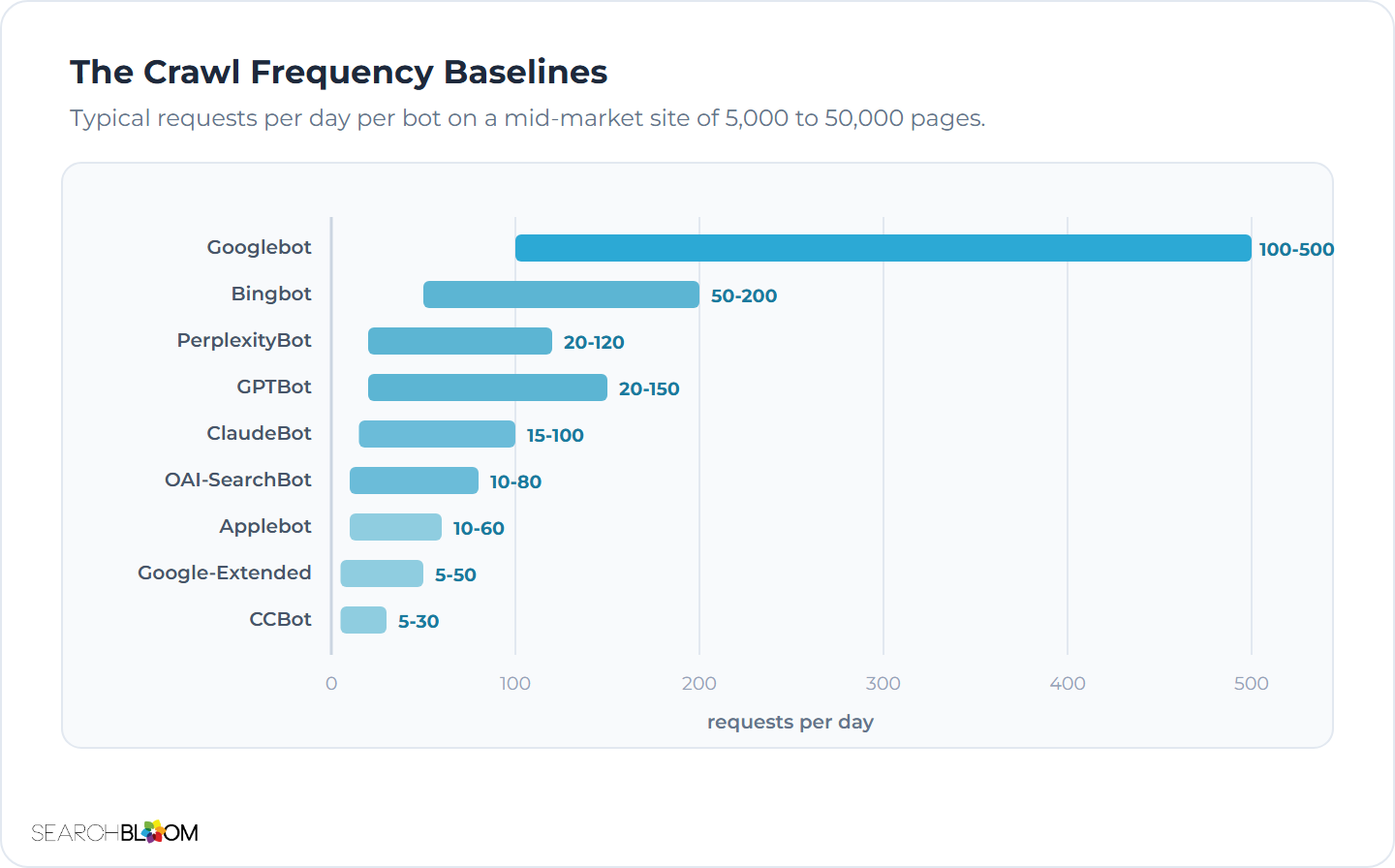
Server log analysis surfaces bot access patterns, but most brands don't know what "normal" looks like for each bot. The Crawl Frequency Baselines below come from our measured Searchbloom partner engagements, and I'd use them as starting points, adjusted for site size and content velocity.
- Googlebot. 100 to 500 requests per day on a typical mid-market site (5,000 to 50,000 pages), with high variability depending on site authority and content freshness. Below 50 requests per day is suppressed access, and I'd run diagnostics.
- Bingbot. 50 to 200 requests per day on a typical mid-market site; Bing crawls less aggressively than Google.
- GPTBot. 20 to 150 requests per day on most mid-market sites (the rate increased substantially in 2025 as OpenAI scaled its training infrastructure), and below 10 requests per day is suppressed.
- OAI-SearchBot. 10 to 80 requests per day, depending on how often ChatGPT users query topics relevant to the brand's content; real-time retrieval traffic comes in bursts and isn't constant.
- ClaudeBot. 15 to 100 requests per day, a rate that scaled up significantly in 2025 and 2026 as Anthropic's user base grew.
- PerplexityBot. 20 to 120 requests per day. Per unit of user query volume, Perplexity is the most aggressive retrieval crawler among the major AI vendors.
- Google-Extended. 5 to 50 requests per day, since the training crawler is less aggressive than Googlebot.
- Applebot. 10 to 60 requests per day, higher for brands with a strong Apple ecosystem presence (app store, Mac software).
- CCBot (Common Crawl). 5 to 30 requests per day, with periodic large crawl bursts when Common Crawl runs its monthly cycles.
The baselines vary by category. B2B SaaS sites with an active publishing cadence see the higher end of the ranges and static sites with infrequent updates see the lower end, and category-specific content like ecommerce product feeds can drive much higher crawl rates, from Googlebot in particular. Once your site has enough log history, I'd calculate a site-specific baseline for each bot and use that for ongoing monitoring in place of the generic ranges.
A sustained drop below the site-specific baseline signals an access issue: a bot that held a steady request rate and now makes only a handful is blocked at some layer, even if the individual requests still return 200 responses. In that case the bot has decided not to crawl, often because of past blocking that hasn't yet reset in its crawler scheduler, and restoring access plus an IndexNow notification (Chapter 12) speeds its return to baseline.
Server logs show which pages bots actually fetched, and running your own crawl of the same content shows what they could reach. Pairing log analysis with the Embedding Audit in Screaming Frog inventories every URL a crawler can render and confirms that the pages you expect AI systems to retrieve are reachable in the first place, before any embedding-level analysis of the content itself.
Common Mistakes That Defeat Crawler Access
1. The wholesale-block trap. A "User-agent: * Disallow: /" rule blocks every bot, and it's the most common failure in AI Search. Counter-test: fetch your production robots.txt and check for any path-root Disallow under generic User-agent rules.
2. Misreading what Google-Extended controls. Brands block Google-Extended expecting to drop out of AI Overviews (or allow it expecting to qualify for them), and neither one happens, because Google-Extended governs Gemini Apps and Vertex AI grounding and training only, while AI Overviews sit inside Google Search, which Googlebot and the page-level snippet directives above govern. Counter-test: if you blocked Google-Extended to stay out of AI Overviews, check whether you're still appearing in them, because you probably are.
3. Outdated bot lists. A robots.txt that hasn't been updated since 2023 misses OAI-SearchBot, Claude-SearchBot, Claude-User, PerplexityBot, and the other newer agents; they may still fall under your permissive rules through the User-agent * wildcard, but I'd handle them explicitly, since that's safer. Counter-test: when was your robots.txt last updated?
4. CDN bot management overriding robots.txt. When Cloudflare or another CDN config blocks AI bots at the edge, the origin robots.txt doesn't matter, so the brand believes the bots are allowed while the CDN is turning them away. Counter-test: run curl -A "PerplexityBot" against your production URL and check the response code.
5. Plugin-managed robots.txt without operator awareness. WordPress SEO plugins generate robots.txt from their own settings, and whoever runs the site may not understand what those settings do. Counter-test: does the robots.txt on the filesystem match what your production URL returns?
6. Different rules for subdomains. The www subdomain may serve a different robots.txt than the apex domain (and other subdomains can drift the same way), and that inconsistency produces blocking nobody expected. Counter-test: do your apex, www, and any other public subdomains return the same robots.txt rules where intended?
7. Stale sitemap.xml. When the sitemap lists URLs that no longer exist, misses URLs that should be indexed, and carries long-outdated lastmod dates, crawler efficiency drops and the citation lift on new content slows down. Counter-test: spot-check 10 URLs from your sitemap. How many resolve correctly, and what are the lastmod dates?
8. No verification cadence. If nobody spot-checks crawler access, changes pile up over time, and by the time an audit does run it turns up issues that have been costing citation share for an extended stretch. Counter-test: when did you last verify that GPTBot and PerplexityBot can fetch your production URLs?
Questions & Answers
Why does robots.txt matter if AI systems do not always respect it? The major AI vendors (OpenAI, Anthropic, Google, Microsoft, and Perplexity) all publish documented user agents and honor robots.txt, and the minority of scrapers that ignore it aren't the ones driving citations, so a bad robots.txt still works out to a self-inflicted citation outage with the major bots.
Training vs retrieval split? AI vendors split their bots into 2 groups, training bots that collect data for future model versions and retrieval bots that fetch in real time when users ask questions, and the same vendor often runs both under different user agents; most brands allow retrieval and make the training call separately.
Which user agents should I always allow? I'd always allow the retrieval agents (OAI-SearchBot, ChatGPT-User, PerplexityBot, Claude-SearchBot, and Claude-User) plus Googlebot and Bingbot for the organic index that feeds AI Overviews and Copilot, and I'd treat Google-Extended as its own training and grounding decision, since allowing it isn't how you earn citations.
Should I block training bots like GPTBot? Blocking training bots like GPTBot comes down to positioning: most mid-market brands allow them for the long-term entity-recognition benefit, while premium-content brands may block them to protect a competitive advantage, and the one choice I'd rule out is blocking everything by default, which costs citation share at every layer.
How do I verify bot access? I'd verify bot access 3 ways (direct robots.txt inspection, user-agent simulation with curl -A, and server log analysis filtered by user-agent), and on a CDN-fronted site I'd run those tests at the edge, because origin checks alone aren't enough.
What is the wholesale-block trap? The wholesale-block trap is the "User-agent: * Disallow: /" rule that CMS defaults and legacy configs include, which blocks every bot (the AI crawlers a brand wants among them), so auditing for it and unblocking is high-impact work that removes the cap the block was putting on citation share.
Does Cloudflare interfere? Yes, Cloudflare can interfere: it added AI bot blocking by default for some plans in 2024 and 2025, and because that blocking happens at the edge before robots.txt is evaluated, verification has to test at the CDN edge too.
How often should I audit? I'd audit robots.txt quarterly at minimum, since new AI bots keep arriving and a quarterly pass catches the ones that need explicit handling while confirming the existing rules still match what you intended.
